
LocalBusiness Schema: How to Add Structured Data a Local Business Can Trust

Local business schema is code that describes your business, its name, address, phone, hours and location, in a format search engines can read without guessing. You add it by placing a short JSON-LD block on the page that describes your business, filling in Google's required and recommended properties, and validating it before and after launch.
What Is Local Business Schema?
Structured data is a standard way of labelling the facts on a page so a search engine can classify them. The shared vocabulary for those labels is maintained at schema.org, where LocalBusiness is defined as a single physical business or one branch of an organization, such as a restaurant, a bank branch or a medical practice (schema.org, LocalBusiness).
JSON-LD (JavaScript Object Notation for Linked Data) is the format Google recommends for adding structured data; it sits in a script tag and does not change what visitors see. Google also accepts Microdata and RDFa.
HTTP Archive found JSON-LD on 43% of home pages in 2025 and LocalBusiness in the JSON-LD of 3.97% of mobile pages in 2024, and the University of Mannheim's Web Data Commons counted LocalBusiness markup on about 1.5 million hosts in October 2024.
What Schema Markup Can and Cannot Do for a Local Business
Google says LocalBusiness markup can tell it about details such as business hours and departments, and that searches for a business may show a knowledge panel while searches for a type of business may show a carousel (Google Search Central, LocalBusiness structured data, updated 2026-09-08). Markup makes a page eligible for those displays; it does not secure them.
Google is direct about this in its general guidelines: correct markup does not guarantee a rich result, because its systems choose what to show based on many variables, including location and device (Google Search Central, general structured data guidelines). The same page states that a structured data manual action removes a page's eligibility for rich results but does not affect how it ranks in web search.
Google deprecated the FAQ rich result with effect from May 7, 2026, and removed its documentation on June 15, 2026, because Google Search no longer displays the feature (Google Search Central, documentation updates). FAQ markup can still describe a page accurately for other systems, but it should not be added in the hope of extra search listings.
How to Add LocalBusiness Structured Data, Step by Step
First, gather your business details exactly as your storefront, invoices and Business Profile show them.
- Choose the page. Google allows the markup on any page but suggests the one that carries information about your business, such as the contact or location page. A business with several locations defines each location as its own LocalBusiness item.
- Pick the most specific type. Use a subtype such as Plumber, Electrician or Dentist rather than plain LocalBusiness. If you genuinely offer several services, Google accepts an array of types; it does not support the additionalType property for this.
- Add the required properties. For rich-result eligibility, Google requires only two: name and address. Provide the address as a PostalAddress with as many parts as possible, including the province and the country code.
- Add the recommended properties that apply. Telephone (with country and area code), url (a working link to that location's page), geo coordinates (at least five decimal places), opening hours and, if useful, a price range under 100 characters.
- Validate the code. Paste it into Google's Rich Results Test and fix any critical errors. Schema.org's own Schema Markup Validator offers a second check.
- Deploy on a few pages first. Use the URL Inspection tool in Search Console to confirm Google can reach the page and is not blocked by robots.txt, a noindex rule or a login. Google notes that finding and crawling a new page may take several days.
- Keep it current. Update the markup whenever hours, phone numbers or addresses change, and submit a sitemap so Google learns about changes.
A Hypothetical Example
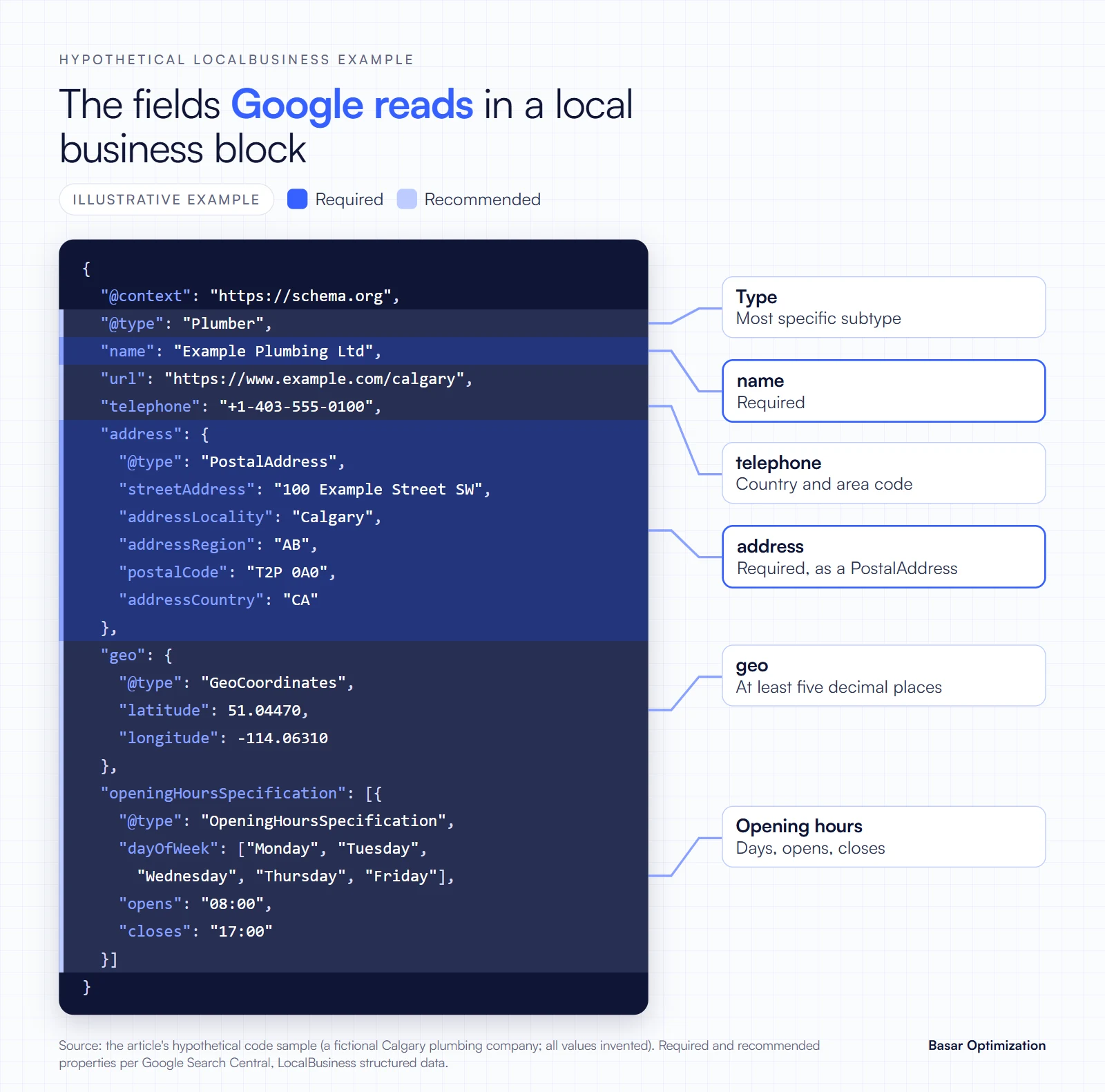
The block below describes a fictional Calgary plumbing company. Every value is invented and must be replaced with your real, visible details.
{
  "@context": "https://schema.org",
  "@type": "Plumber",
  "name": "Example Plumbing Ltd",
  "url": "https://www.example.com/calgary",
  "telephone": "+1-403-555-0100",
  "address": {
    "@type": "PostalAddress",
    "streetAddress": "100 Example Street SW",
    "addressLocality": "Calgary",
    "addressRegion": "AB",
    "postalCode": "T2P 0A0",
    "addressCountry": "CA"
  },
  "geo": {
    "@type": "GeoCoordinates",
    "latitude": 51.04470,
    "longitude": -114.06310
  },
  "openingHoursSpecification": [{
    "@type": "OpeningHoursSpecification",
    "dayOfWeek": ["Monday", "Tuesday", "Wednesday", "Thursday", "Friday"],
    "opens": "08:00",
    "closes": "17:00"
  }]
}
Keep Your Markup Consistent With Your Google Business Profile
Your website markup and your Google Business Profile, the free listing that appears in Google Maps and local results, describe the same business, so they should agree. Google's Business Profile guidelines ask that the name match how the business is known in the real world, consistently across signage, stationery and the website, and that the address or service area be accurate and precise (Google Business Profile Help, guidelines). They also ask for a phone number that reaches the specific location, preferably a local one.
The structured data guidelines add the other half: markup must represent what is visible on the page. Put together, the safest pattern is one set of business facts shown on the page, repeated in the markup and matched in the Business Profile.
Service-area businesses need extra care. Business Profile guidelines tell a business that serves customers at their homes, such as a plumber working from a residence, to hide its address from customers. LocalBusiness markup, however, requires an address. Before publishing a street address in markup that you have hidden on your profile, decide whether you are comfortable showing it on the page as well, since the markup should match visible content. Why Google Business Profile optimization matters covers the profile side in depth.
Common Local Business Schema Mistakes
| Mistake | Why it matters | Fix |
|---|---|---|
| Adding review stars or aggregateRating about your own business | Google recommends review properties only for sites that capture reviews of other local businesses | Leave them out; earn reviews on your Business Profile instead |
| Markup that differs from the visible page | Google's guidelines require markup to represent visible content | Show the same name, address, phone and hours on the page |
| Generic LocalBusiness type | Loses detail Google could use | Use the most specific subtype |
| Phone without country code | Google asks for country and area code | Write it as +1 followed by the full number |
| Coordinates with too few decimals | Google requires at least five | Copy precise coordinates from a map |
| Markup on a blocked page | Google cannot read it | Check robots.txt and noindex with URL Inspection |
| Outdated hours or address | Google asks for up-to-date information and will skip rich results for time-sensitive details that have gone stale | Update markup and profile together |
Reviews matter for local trust, as the analysis of Google reviews as local trust signals shows, but they belong on platforms where customers leave them, not in self-written markup.
Final Thoughts
LocalBusiness schema is one of the simplest pieces of technical SEO a local business can get right: two required properties, a handful of recommended ones, and a validation step. Its value comes from accuracy and consistency, not from volume, and it works best as part of a wider local SEO effort that keeps the website, the markup and the Business Profile in agreement.
To have your markup checked against Google's documentation and your profile, you can request a quote and we will review it with you.
Frequently Asked Questions
Does local business schema improve rankings?
Google does not describe LocalBusiness markup as a ranking boost. It helps Google understand your business details and can make a page eligible for displays such as a knowledge panel, but Google states that correct markup never guarantees a rich result. Treat it as accurate labelling that supports your local visibility, not as a shortcut to higher positions.
Do I need schema if I already have a Google Business Profile?
They do different jobs. The Business Profile is your listing in Maps and local results, managed through Google. LocalBusiness schema labels the same facts on your own website. Keeping both accurate and consistent gives search engines one clear picture of the business, so most local businesses benefit from having both, provided the details match exactly.
Should I still add FAQ schema?
Not for search listings. Google stopped showing the FAQ rich result in its search results from May 7, 2026, and removed the documentation in June 2026. FAQ markup that matches the visible text can still describe a page's questions for other systems, but it should not be expected to change how your page appears in Google.
Can I add review stars to my own LocalBusiness markup?
Google recommends the review and aggregateRating properties only for sites that publish reviews about other local businesses, such as directories. A business marking up ratings about itself falls outside that guidance, and Google warns that reviews not written by real users can lead to a manual action. Collect reviews on your Business Profile instead.