
12 Conversion Rate Optimization Fixes for Service-Business Websites
Twelve changes grounded in published standards and usability research, each with the reason it matters and a way to check whether it worked.
Executive Summary
Conversion rate optimization is the practice of changing a website so that a larger share of its visitors complete a valuable action, such as requesting a quote or calling. For a service business, those actions are few and specific, which makes the work more tractable than it is for a large online store.
This paper sets out twelve fixes. None relies on a vendor's promised percentage. Each is anchored in a source a business owner can check: Google's measurement documentation, the W3C's Web Content Accessibility Guidelines, eyetracking and form research from the Nielsen Norman Group, and Google's Core Web Vitals. The first fix is measurement, because a change that cannot be measured cannot be judged.
Scope and Method
The list is written for local service businesses (trades, clinics, professional firms) whose website exists mainly to produce enquiries. Ecommerce checkout flows are out of scope.
Sources were read in November 2026. Standards and platform documentation come from the W3C (WCAG 2.2), web.dev and Google Search Central, Google Ads Help and Google Analytics Help. Usability evidence comes from published Nielsen Norman Group (NN/g) articles. Where a study reports a figure, its scope is stated next to it.
One limit is deliberate. Industry articles often quote conversion gains for individual changes. Those figures depend on traffic, offer and audience, and this paper does not repeat any. Your own website conversion rate, measured before and after, is the only number that applies to you.
What conversion rate optimization means here
A conversion is one completed action you have decided is valuable. The conversion rate is conversions divided by visits over the same period. Optimization means removing whatever stops a ready visitor from acting, not persuading an unready one.
| # | Fix | Problem it addresses | Main source | How to measure |
|---|---|---|---|---|
| 1 | Track conversions first | Changes cannot be judged | GA4, Google Ads Help | Key events recorded per day |
| 2 | Match the landing page to the search | Visitor lands on the wrong answer | Google Ads Help | Landing page experience status |
| 3 | Answer in the first lines | Scanners miss the offer | NN/g eyetracking | Scroll and engagement, enquiries |
| 4 | Information-bearing headings and buttons | Vague labels get skipped | NN/g | Clicks on primary button |
| 5 | Tappable, tracked phone number | Calls go uncounted | Google Ads Help | Call conversions |
| 6 | Adequate tap targets | Mis-taps on mobile | WCAG 2.5.8 | Mobile enquiry rate |
| 7 | Shorter, single-column forms | Effort and abandonment | NN/g | Form starts vs submissions |
| 8 | Visible labels | Memory strain, errors | NN/g, WCAG 3.3.2 | Error rate, submissions |
| 9 | Specific error messages | Users cannot recover | NN/g, WCAG 3.3.1 | Failed submits |
| 10 | No repeated entry | Multi-step friction | WCAG 3.3.7 | Step-to-step drop-off |
| 11 | Readable contrast | Text cannot be read | WCAG 1.4.3 | Accessibility audit |
| 12 | Fast, responsive, stable pages | Delay and mis-clicks | web.dev | Core Web Vitals report |
1. Track conversions before changing anything
Why: Without a recorded baseline, any change is an opinion. How: In Google Analytics 4, an action you care about is marked as a key event; standard properties allow up to 30. Mark the form submission and the phone-link tap at minimum. If you run ads, Google's conversion measurement documentation explains that phone calls, website actions and offline sales can each be counted, and that only GA4 key events can be imported into Google Ads.
Measure: Confirm events appear in reports for a week before touching the page. Google notes newly marked key events can take up to 24 hours to show in standard reports. Building reliable dashboards from this data is the core of data-driven marketing.
2. Landing page optimization: match the page to the search
Why: Google's Quality Score help treats landing page experience as a judgment of whether the page actually serves someone arriving from the ad, rated against other advertisers on the same search over the previous 90 days. A visitor who searched "furnace repair" and lands on a general home page has to hunt.
How: Send each ad group, and each priority search term, to the page that answers it: the specific service, the area served and the next step. Landing page optimization in this sense is a routing decision before it is a design decision.
Measure: Check the landing page experience status per keyword ("Above average", "Average" or "Below average") and the conversion rate per landing page.
3. Put the answer in the first lines
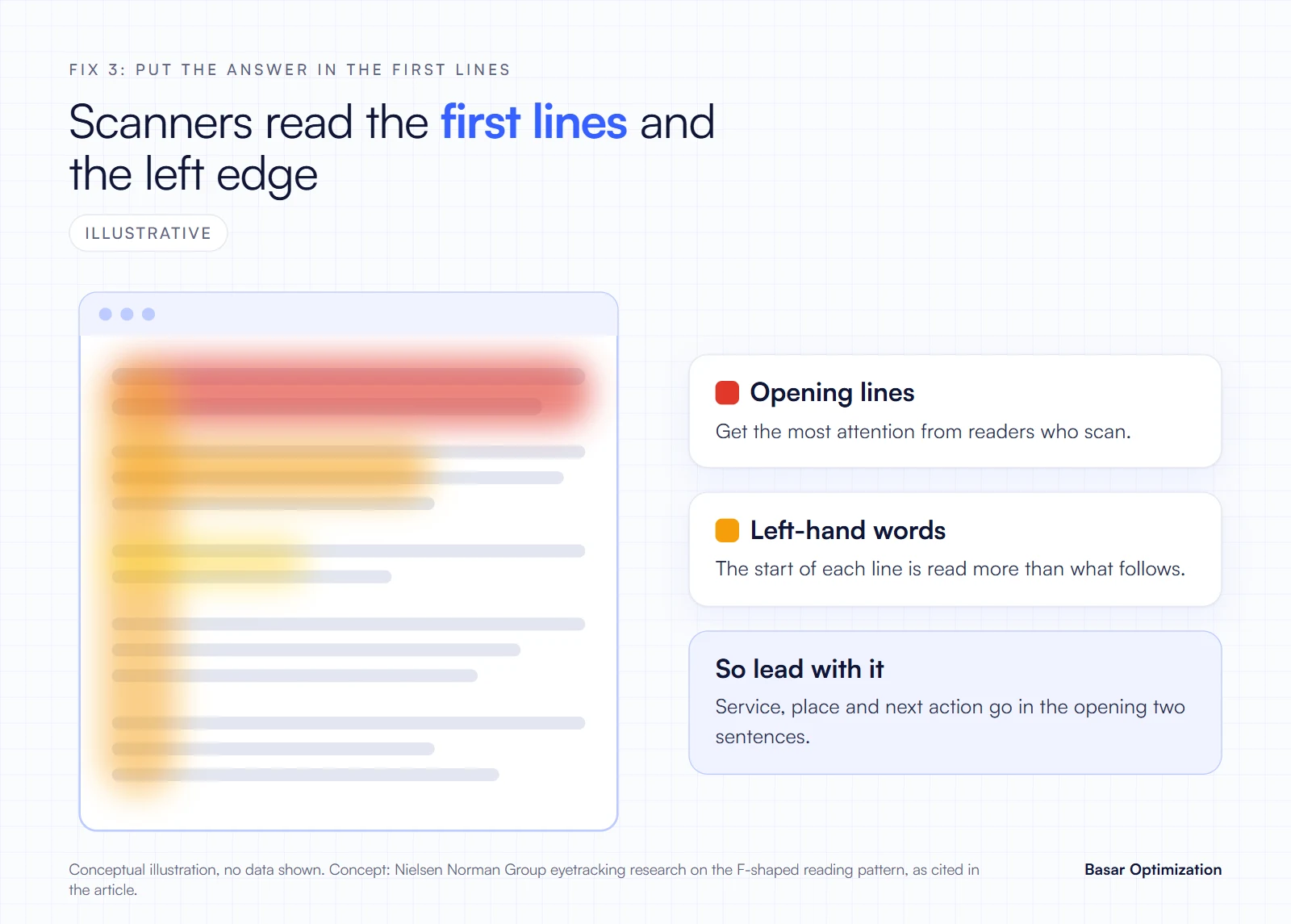
Why: NN/g's eyetracking research on the F-shaped pattern found that readers who scan give the first lines of content, and the left-hand words of each line, more attention than what follows. The pattern holds on phones as well as desktops.
How: State the service, the place and the next action in the opening two sentences. Move history, mission statements and long introductions lower down. Among the remedies NN/g proposes are front-loading what matters most into the opening paragraphs and deleting copy that adds nothing.
Measure: Compare enquiry rate and engaged sessions for the page before and after.
4. Write headings, links and buttons that carry information
Why: In the same NN/g work, the remedy for scanning is to make the first two words of a heading enough to convey the section, and to give links words that describe their destination rather than "click here" or "more". Descriptive labels also help people who hear links read aloud.
How: Replace "Learn more" with "See furnace repair prices" and "Submit" with "Request my quote". Begin each heading with its subject.
Measure: Clicks on the primary button, and the share of visitors who reach the quote page.
5. Make the phone number a tappable, tracked link
Why: For many service businesses the phone is the main conversion, and an untracked call is invisible in every report. Our earlier paper on clicks-to-call as a local conversion signal covers why calls carry weight; this fix is about capturing them on the website.
How: Format the number as a tap-to-call link on mobile. For ad traffic, Google Ads can track calls from a website by swapping in a Google forwarding number and counting a call only once it passes a minimum length you choose, which filters out wrong numbers and hang-ups.
Measure: Phone-link taps in GA4 and qualified call conversions in Google Ads.
6. Give every tap target enough room
Why: WCAG 2.2 success criterion 2.5.8, Target Size (Minimum), sets 24 by 24 CSS pixels as the floor for pointer targets, with exceptions such as adequate spacing or inline links in a sentence. Below that, people tap the wrong control.
How: Audit buttons, phone links, menu items and form controls at phone width. Treat 24 pixels as the conformance minimum, not the design goal; primary actions deserve more.
Measure: Mobile enquiry rate compared with desktop, before and after.
7. Cut the form to fields you use, in one column
Why: NN/g's form usability recommendations put brevity first: remove any field whose information can be derived, gathered later or skipped. They also advise one field per row, because multiple columns break the downward flow, and labelling optional fields clearly.
How: For a quote request, name, contact method and a short description often suffice; ask for address and timing on the follow-up call. Keep fields in a single column in a predictable order.
Measure: Form starts against form submissions, if your analytics records both.
8. Keep labels visible; do not rely on placeholders
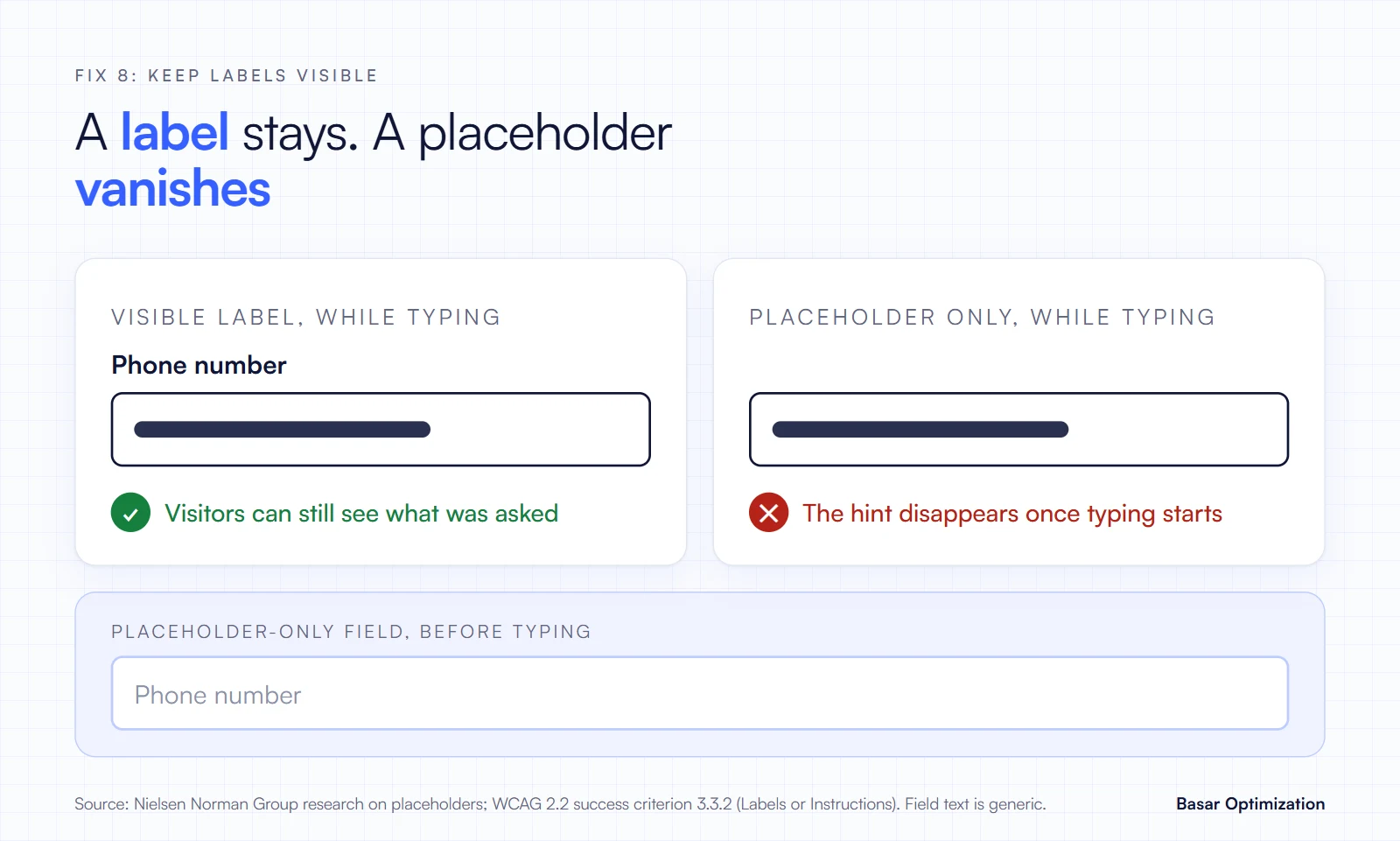
Why: Placeholder text, the grey hint inside an empty field, disappears when the visitor starts typing. NN/g's research on placeholders lists the consequences: people forget what a field wanted, cannot review their answers before sending, and struggle to fix errors. Light grey hints also tend to have poor contrast, and not every screen reader announces them. WCAG success criterion 3.3.2, Labels or Instructions, requires labels or instructions wherever input is needed.
How: Put a persistent label above each field. Use hints outside the field for anything essential, such as a required format.
Measure: Error rate and completed submissions.
9. Make error messages specific and keep what was typed
Why: WCAG success criterion 3.3.1, Error Identification, requires that when a form detects a mistake on its own, it points to the faulty item and explains the problem in words. NN/g adds that errors should be signalled by more than colour alone and that whatever the visitor typed should stay in place for correction.
NN/g also summarizes a peer-reviewed study by Seckler and colleagues (ACM CHI 2014). In a lab, 65 participants filled in either the original or a guideline-improved version of three registration forms from German-language news websites. Pooled across the three forms, 78% of the improved forms filled in were submitted successfully on the first try, against 42% of the originals. The scope matters: this was one small laboratory study of newspaper registration forms, measuring first-try success rather than business conversion rates, and the authors themselves call for tests with other kinds of forms and outside the lab.
How: Name the field and the problem ("Phone number is missing a digit"), place the message beside the field, and never clear the form on error.
Measure: Count failed submission attempts, where your form tool records them.
10. Never make visitors re-enter details
Why: WCAG success criterion 3.3.7, Redundant Entry, asks that information a user already gave in the same process is filled in automatically or offered for selection, with limited exceptions such as security re-entry. Multi-step quote and booking flows are where this is most often broken.
How: Carry name, email and address forward between steps, and offer "same as service address" for billing details.
Measure: Drop-off between each step of the flow.
11. Make text readable
Why: WCAG success criterion 1.4.3, Contrast (Minimum), sets a contrast ratio of at least 4.5:1 for normal text and 3:1 for large text. Pale grey body copy and white text on photographs commonly fail it, and outdoor phone use on a bright day makes the problem worse.
How: Check body text, button labels and form hints with any contrast checker, and place text over images only on a solid or darkened panel.
Measure: Pass or fail per element in an accessibility audit; then the enquiry rate.
12. Make pages load fast, respond quickly and hold still
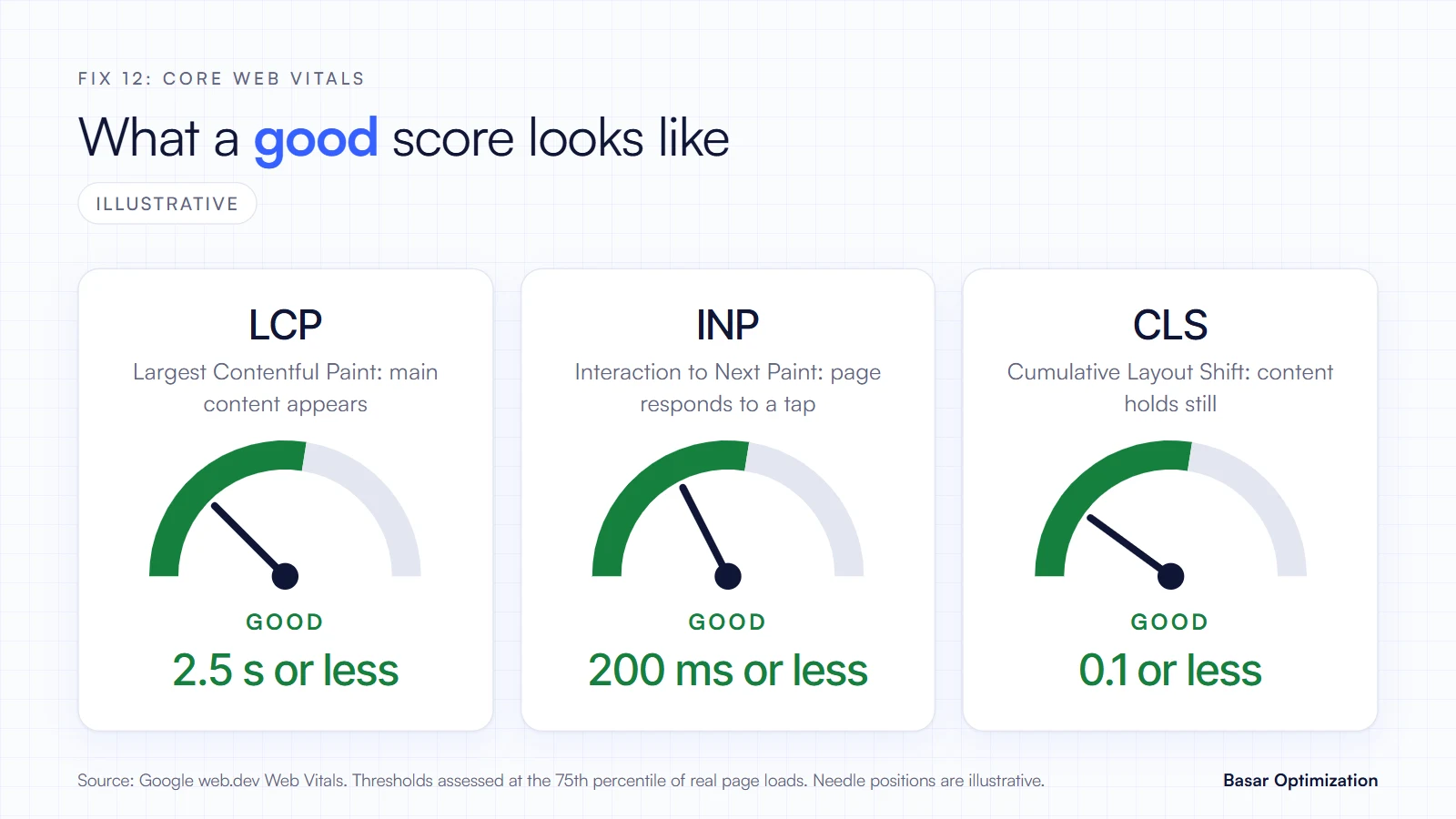
Why: Google's Web Vitals initiative defines three Core Web Vitals: Largest Contentful Paint (LCP), the time until the main content appears, which should be 2.5 seconds or less; Interaction to Next Paint (INP), the delay before the page visibly responds to a tap or click, which should be 200 milliseconds or less; and Cumulative Layout Shift (CLS), a score for unexpected movement of content, which should be 0.1 or less. Each is assessed at the 75th percentile of real page loads. Web.dev's CLS guide notes that sudden shifts can make people lose their place or press the wrong button.
How: Compress and size hero images, reserve space for images and embeds, limit third-party scripts and test on a mid-range phone over mobile data. A quote button that jumps as a banner loads is a conversion problem as well as a speed problem.
Measure: Search Console's Core Web Vitals report and PageSpeed Insights field data. Google's page experience guidance confirms its ranking systems use Core Web Vitals, while stating that good scores do not guarantee top rankings. When the fixes need a rebuild, that is web development work.
How to test a fix without misleading yourself
A/B testing, splitting traffic between two versions of a page, needs enough conversions in each version to separate a real difference from chance. Many local service sites do not have that volume. For them, a cleaner method is a dated before-and-after comparison: change one thing, note the date, and compare equal periods while watching for seasonal shifts and ad changes that could explain the difference.
If you run automated bidding in Google Ads, the platform advises allowing one to two conversion cycles for the system to adjust after a significant change in conversion behaviour. Fixes 1, 5 and 9 can all change what gets counted, so log them alongside any campaign edits in Google Ads management notes.
What this means for your business
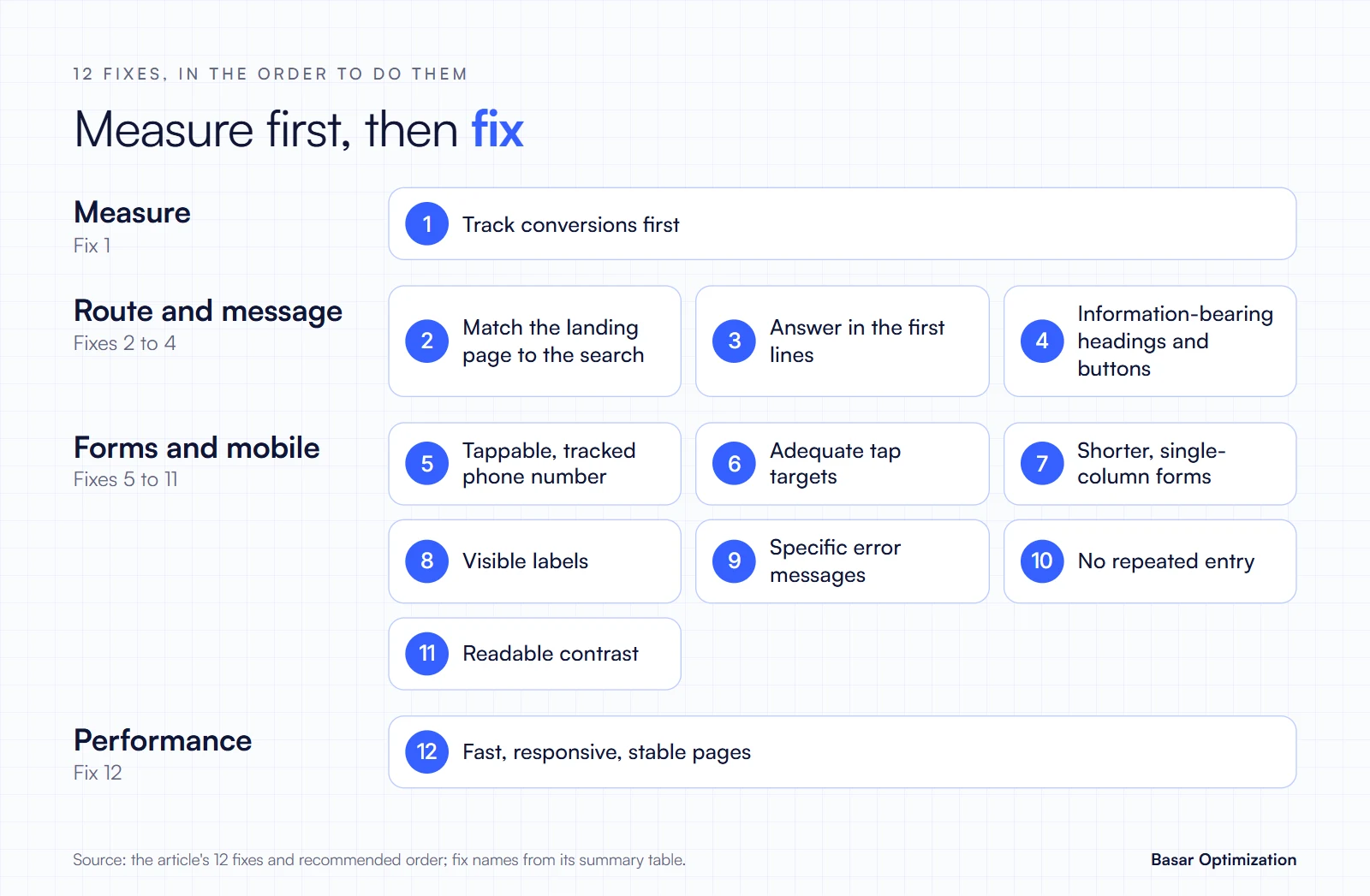
Most of the twelve fixes cost little to make and need no new traffic. They remove friction for visitors you are already paying to attract, whether through search, ads or referrals. The order matters: measurement first, then the routing and message fixes (2 to 4), then the form and mobile mechanics (5 to 11), then performance (12), which usually needs a developer. That is the order we recommend to service businesses looking at conversion rate optimization in Calgary.
Several of these items are also accessibility requirements. Meeting them widens the group of people who can use your site and reduces the risk of excluding customers with low vision, motor impairments or screen readers. A site built around these mechanics from the start avoids retrofitting them later, and routing each enquiry to the right person once the form is sent is the kind of workflow our business tools work covers.
Conclusion
Conversion rate optimization for a service website is less about clever persuasion and more about removing obstacles that published standards and research already describe. Track the actions that matter, send visitors to the page that answers their search, say what you offer in the first lines, make calls and forms effortless on a phone, and keep pages fast and stable. Then measure each change against its own baseline.
If you would like these twelve checks applied to your own landing pages, you can request a quote for a review.
Frequently Asked Questions
What is a good website conversion rate for a service business?
There is no single benchmark that fits every service business, because traffic sources, offers and the share of enquiries made by phone vary widely. The useful comparison is your own site against its earlier self, measured on the same actions over equal periods. Start by tracking form submissions and phone taps so that you have a reliable baseline.
How do I improve my website conversion rate?
Begin by tracking conversions, then fix the issues that block ready visitors: send each search or ad to a page that answers it, state the service and next step in the opening lines, make the phone number tappable, shorten forms, keep labels visible and make error messages specific. Finally, improve loading speed and stability, and measure each change against its baseline.
Should I A/B test on a low-traffic website?
Usually not as a first step. An A/B test needs enough conversions in each version to separate a real difference from chance, and many local service sites do not reach that volume quickly. A dated before-and-after comparison, changing one element at a time and checking for seasonal or advertising changes, is often a more practical method for smaller sites.
Does conversion rate optimization help SEO?
Indirectly in places. Google states that its ranking systems use Core Web Vitals and reward a good overall page experience, but also that good scores do not guarantee top rankings. Most conversion fixes, such as clearer forms or tappable phone numbers, are aimed at visitors rather than rankings, and their value shows up in enquiries rather than in search positions.
How long should I wait before judging a change?
Wait until each period you compare holds enough conversions to be meaningful, and compare equal lengths of time that avoid obvious seasonal swings. If automated bidding in Google Ads uses the conversions you changed, Google advises allowing one to two conversion cycles for the system to adapt. Record the date of every change so that results can be attributed correctly.